

- Is the source set up correctly? Check source status, credentials, advertised capabilities, and compliance.
- What happened on recent buyer traffic? Inspect recent AdCP calls, responses, task statuses, and failures for that source.
A timeout is not an error response
A typedtimeout means the call did not finish inside the observer’s budget.
It does not mean the Source returned an error, is unreachable, or is currently
unhealthy. For example, a get_products call can exceed a 30-second buyer
window and then complete successfully in 35.7 seconds when observed with a
longer 45- or 60-second budget. A fresh test with the same 30-second budget may
simply reproduce that budget mismatch; compare it with a 60-second observation
before diagnosing reachability.
The response exposes the mechanism as condition: "timeout", separately from
the diagnostic impact (status: "degraded"). A completed error response uses
condition: "error_response"; a connection failure uses
condition: "transport_error". Reporting has its own health axis, so an
inventory observation timeout does not make healthy reporting unhealthy.
None of these health observations changes request eligibility by itself.
Human-facing Source Health surfaces use one vocabulary: Healthy,
Degraded, Erroring, and Unknown. The detailed diagnostics API keeps
the older unhealthy value in source.health.status and capability
observations for wire compatibility; clients should present that value as
Erroring. Do not infer the failure mechanism from that status. Read
condition: timeout is observer-budget exhaustion and is degraded evidence,
while error_response means the Source actually returned an error.
Diagnostics keep three evidence types separate:
- A source test is an explicit sandbox test against the selected source.
- A source call is an observed protocol exchange with the selected source,
such as
get_capabilitiesor an Agent-suppliedget_productsrequest. - A storefront buyer-path or composition run describes work at the storefront layer. It is not evidence that the selected source was called unless a source exchange is attached to it.
Physical transport evidence
transportRequests is the bounded, redacted record of outbound protocol
attempts. It is separate from logical recentActivity and the health verdict:
one logical operation can create several physical requests.
For media-buy creates and updates, groupId identifies the application
operation and each SDK session keeps its own debugId. Local stages show setup
and whether mutation dispatch was attempted. physicalRequestCount excludes
local stages; logicalOperationCount counts accepted operation envelopes.
If mutation_not_dispatched is present, Interchange stopped locally and no
remote mutation request or response was recorded. This does not establish that
the remote media buy is unchanged. An authoritative readback is required.
This distinction matters for no_ingredients: a composition run can stop at
the storefront before it calls the external sales agent. That failure must not
be shown as a failed source call or source test. On the Agent-supplied product path,
the storefront sends the brief to the external agent’s get_products; that
call uses the agent’s finished products and does not require ingredients.
Read seller readiness without combining unrelated results
For a source linked to an Agent, Source Diagnostics shows three separate results:- Marketplace availability says whether the storefront can currently transact. Resolve any listed blocker in Seller Setup.
- Agent certification applies to the Agent’s current revision. If it needs attention, open the Agent page and complete its certification work. A stale certification does not by itself change the marketplace result shown here.
- Source health is the latest observed condition for this exact source. When it is degraded, erroring, or unknown, open Setup and refresh capabilities before changing the source. That refresh checks the endpoint, credentials, and declarations; it does not prove product discovery or a media-buy lifecycle.
Endpoint
GET /api/v2/storefront/inventory-sources/{sourceId}/diagnostics
Returns seller-facing diagnostics for one third-party sales-agent or modular
inventory source. The response combines the current source setup, recent AdCP
activity, test-run evidence, latency rollups, error rates, discovery
participation, demand impact, and developer handoff identifiers. New outbound
calls include a partner-safe x-scope3-debug-id that also appears in the
diagnostics handoff.
Canonical reporting evidence
The response’sreporting field is an independent projection of the canonical
reporting ledger for this exact Source. It does not derive reporting health
from generic Source activity or copy one Source’s result onto its Agent.
availabilitysays whether canonical reporting evidence is supported or unsupported. It isnullwhen no value was observed.healthuseswaiting,healthy,delayed,action_required, andcomplete.sourceProvenance: acquiredappears only when an immutable acquisition plan proves the Source attribution.nullmeans that proof was not observed, not that the Agent lacks reporting capability.obligationspreserves period, expected time, required finality, coverage, missing-first-report state, issue ownership, and latest revision evidence.lastSuccessfulRevision,dataThrough,nextExpectedAt, andfreshnessdescribe the most recent usable reporting state.- Truncation flags mark bounded obligation and related-media-buy collections. A response that exceeds the obligation-row limit returns nullable aggregate reporting state instead of projecting health from partial evidence.
reason: adapter_pending until their typed
adapters are connected.
To run a direct source test, use the shared storefront operation
run_inventory_source_discovery_test, backed by:
POST /api/v2/storefront/inventory-sources/{sourceId}/tests/discovery
This source-scoped operation calls the selected external sales agent’s
get_products with a read-only brief. It creates no media buy, spends nothing,
and does not test reporting or webhooks. Its outcome, product count, step, and
available debug identifiers are recorded as a durable source test run, so the
result remains available from list_agent_test_runs and in Source Diagnostics.
Refresh current health evidence
If Source Diagnostics shows stale or conflicting health evidence, ask Murph to refresh the affected inventory source, or callrefresh_inventory_source_health from an MCP client with that source’s
sourceId. No refresh is needed when diagnostics does not request verification.
The operation sends one no-spend get_products request to that source. It does
not change source configuration, create a media buy, or test reporting or
webhooks. Its response returns the timestamped outcome, recorded run, task,
operation, debug, and correlation IDs, and refreshed storefront readiness. The
same evidence appears in Source Diagnostics.
MCP hosts open the same Source Diagnostics app through the typed
open_source_diagnostics tool. The widget and its actions use shared MCP
contracts rather than sending a new chat message to Murph.
Run the full Sales Agent validation
For a third-party Sales Agent Source, Test & certify runs the currenttest-sales-agent skill. A separate Buyer Account is optional: when you
do not select one, Interchange creates the validation Advertiser and draft
Campaign inside the Media Company account’s isolated seller sandbox. If you do
select a reachable Buyer Account, validation continues to use that account.
Choosing No auth completes credential setup for a public endpoint; there is
no secret to submit. Murph inspects the saved Source and continues to
diagnostics instead of reopening the credential form. A validation window with
no qualifying calls remains untested, not failed.
Request
Parameters
Response
diagnosis.owner tells you who must act:
seller— a generic external sales agent you operate, or an adapter whose credentials need re-authorizing. ThetopCauseandnextStepsare addressed to you.scope3— an official Scope3-hosted adapter (Pinterest, Reddit, Snap, …) whose runtime is failing. Scope3 operates that runtime; the failure is ours to fix and recovers automatically, so there is nothing for you to do.nextStepswill say so rather than asking you to debug our infrastructure.
diagnosis.topCause is the primary explanation to show first. Use
diagnosis.issues[] when more than one signal is present in the same window:
for example stale async callbacks, caller-deadline timeouts, slow responses,
non-timeout failures, input-required responses, business rejections, skipped
diagnostic attempts, missing auth, or inactive sources. Each issue includes a
stable mode, severity, affected count, and human-readable summary.
Issue mode values use the same source failure vocabulary as the diagnosis
model, such as stale_async, timeout_degraded, auth_missing,
source_runtime_error, business_rejected, and input_required.
comparison.trend is a quick movement signal, not an uptime or SLA claim. It
compares sampled source activity in the requested window with the immediately
previous window of the same length. not_enough_data means neither window has
enough source activity to compare; latency remains unknown when request and
response rows cannot be paired.
Zero calls in the selected window means the operations are untested in that
window. It is not a failed call and cannot, by itself, support an Erroring
verdict. Likewise, missing validation assertions mean no qualifying run has
assessed them yet; read the captured health observation or failed exchange
before attributing a failure to the Source.
The latest source-health check can be older than the selected activity window.
When an older failed check has no newer traffic to confirm or clear it, the
overview labels it as stale evidence and asks for current verification. It does
not claim the source is currently down, and it does not say that no action is
needed. A healthy completed get_products result takes precedence over an
unhealthy sync_creatives observation only when it is at least 24 hours newer
and both observations remain inside the seven-day freshness window. Other
current unhealthy observations stay visible and can still affect readiness.
Capability health observations
source.health is one collapsed cell for the inventory axis: the same
worst-of-fresh collapse described below for capabilityHealth.inventory, not
whichever check happened to write last. Its own status field is healthy,
degraded, unhealthy, or unknown (unknown when nothing has ever
reported) — a survivor of the per-source column this field has always read,
kept as its own four-value field for compatibility.
Present unhealthy as Erroring in human-facing output.
Two of its other fields follow the same “worst check wins, not last check
wins” rule, which matters when more than one check is reporting on the same
source:
lastSuccessAtis the last time the currently worst-reporting check saw a healthy result, not the most recent success across every check. If that worst-reporting check has never once succeeded,lastSuccessAtreadsnulleven though a different, healthy check has a success history.lastErrorAtclears back tonullas soon as the collapsedstatusishealthy, rather than continuing to show a past error that no longer reflects current state.
source.capabilityHealth is the fuller picture behind that cell, and it uses
a different convention for “nothing has reported”: null instead of the
string unknown. It has two axes, inventory and reporting, and each axis
carries both a derived status and the observations[] evidence behind it:
Each entry in
observations[] has:
Three things follow from that shape:
- Different checks watch the same source and can disagree. A source can
have one check confirming
get_productsconnectivity while a separate reporting check is failing, and both readings stay visible inobservations[]at once: for example, one check reporting the connection is fine while another reports the reporting feed failing. The old single cell was last-writer-wins: whichever check happened to run most recently silently overwrote whatever the others had reported, and the disagreement was lost.statusrestores that visibility without giving up a single verdict: it is computed across every reporting check, not just whichever wrote last. - An empty
observationsarray means no check has reported on that axis yet, andstatusreadsnullaccordingly. A source with no reporting checks configured shows"reporting": { "status": null, "observations": [] }; read that as “not observed,” not as “reporting is fine.” - A reading can go stale, and
statusalready accounts for that. A check that stopped running leaves its last reading in place indefinitely;statusdiscounts a reading old enough to no longer describe current state in favor of fresher evidence on the same axis. The same rule this page already applies tosource.healthapplies here: a failure with no newer activity to confirm or clear it is stale evidence that needs current verification, not a confirmed current outage. - Each axis’s
observations[]array is capped at 20 readings, newest first. A source realistically reports through a handful of named checks per axis, so this is not a limit you should expect to hit in practice.
Errors
400 BAD_REQUEST—windowHoursis not a positive integer or is greater than720.401 UNAUTHORIZED— missing or invalid API key.404 NOT_FOUND— no inventory source with thissourceIdexists for the storefront.
Open the diagnostics surface
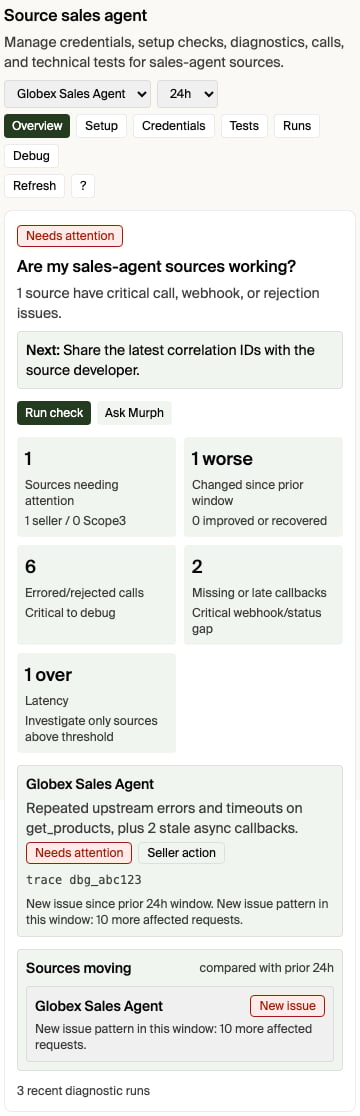
- From the source itself. In the ad-server or sales-agent source app in chat, use Open full diagnostics. It opens the Source Diagnostics app already focused on the connection you had selected. (The in-app View details / View diagnostics buttons are different — they switch to the advanced tab inside the same source app.)
- From Pending operations. When a source you operate degrades, it appears in the Sources degraded group of the Pending operations view with its severity and a one-line summary. Each row’s Open full diagnostics opens the Source Diagnostics app scoped to that source.
- By asking Murph. Ask “why is
<source>failing?” or “show me diagnostics for<source>” — Murph opens the Source Diagnostics app scoped to that source. Naming the source focuses the app on it; otherwise it opens on the source you last had selected. - From the Help menu. Open Ask Murph, choose Help, then choose Diagnostics for the storefront-wide diagnostics view (change history, Calls, source tools, test runs).
- Start with the question: is this source healthy, what changed, and who acts?
- Choose the evidence window. Start with 24 hours, narrow for an active incident, or widen it to confirm a pattern.
- Read the overview verdict before inspecting individual calls.
- Use Evidence for recent calls and partner-safe handoff identifiers.
- Take the smallest diagnosed next action, then refresh or run a focused test.
get_products
directly with a read-only, no-spend brief and records the result as a durable
source test run. It does not create a media buy. Refresh capabilities is the
secondary setup check: it calls the source capability endpoint directly and
shows the result in the app; it does not send a synthetic question to Murph.
Capability refresh verifies endpoint reachability, credentials, and declared
tools only—it does not prove discovery. The refresh is scoped to the selected
Source’s own connection identity, so it works even when that Source has no
legacy standalone Agent record.
A buyer-path result appears under the selected source only when diagnostics have
an observed source exchange to attribute to it. A storefront intelligence run
that stopped before source dispatch remains storefront evidence, not a failed
call against the external agent.
In Setup, diagnostics show the selected Source’s provider-declared mode,
effective product path, and readiness. That authority is read-only in
Interchange. To remediate an incomplete wholesale path, correct the Agent’s
reported product, property, format, pricing, or execution declaration, then ask
Scope3 support to refresh or reconcile the capability. Do not change a mode to
hide a readiness failure.
For an Agent-supplied source, Connected means its source connection and required
credentials are ready. Setup does not wait for an Interchange wholesale catalog,
and a null reporting status (no reporting check has reported yet) does
not become setup work. A subsequently observed degraded or unhealthy source is
shown as Needs attention instead.
Powered by
When the selected Source is backed by a Sales Agent, Setup shows a Powered by card naming that Agent and linking to its Agent Page. The card’s heading reflects who holds the Agent, not just that one exists:
See Agents for the
underlying
powered-by-agent endpoint and its ACTIVE / UNMAPPED / REVOKED
states.
The tour changes tabs and highlights controls, but it does not change source
configuration. Any product action keeps its normal safeguards.
You can also open Source Diagnostics directly by replacing <account-id> with
your account id:
diagnosticsSourceId:
Start with the inventory source
Open the storefront inventory source in the app, or call Get storefront readiness. ThesourceDiagnostics[] entry for each source gives the current operating picture:
If the source is not active, credentials are missing, or the source does not
advertise the tool you need, fix that before debugging individual buyer
requests.
Treat a failed capability refresh and failed source traffic as separate
signals. A refresh can fail while a recent
get_products call succeeds, and
that successful call is direct evidence that the source responded. Planning
can continue from a clearly labeled last-known capability document; when no
capability document is available, it reports the probe failure separately
instead of treating missing metadata as proof that the source is unreachable.
Understand product paths
TheproductMode.paths[] diagnostics report each Source’s effective runtime
path and its readiness. Storefront-built means Interchange can use ready
wholesale inputs from the Source when composing products. Agent-supplied
means the connected Agent returns complete buyer-ready products. An Agent that
supports both reports each path independently; a problem on one path does not
silently reclassify the other.
Use the Source’s normal detail page for connection and operating actions, and
use productMode diagnostics to identify whether the Source, Scope3, or the
connected Agent owns a readiness problem.
Storefront readiness also includes Interpretable product formats when
canonical-format compliance is enabled for your storefront. Direct canonical
format_options[] and projectable legacy {agent_url, id} references both
pass, regardless of source age. If a legacy product contains several format
references, at least one usable canonical projection keeps the product
available; an unsupported sibling reference is omitted from the buyer-facing
format options and remains visible as an advisory diagnostic. A product with no
usable canonical option is withheld on its own, while the Source and its other
products remain request-eligible.
Seller Setup prefers public catalog evidence when a source has it, so an older
buyer-account or sandbox-test observation does not override a corrected public
declaration. Buyer discovery and purchase still validate the relevant account
context before products can serve. The readiness check names unresolved
products and their affected Source as repair guidance; it does not make the
storefront transaction-ineligible. Replace an unsupported custom reference
with an exact shared-catalog reference or publish an interpretable custom
canonical declaration. The Source’s separate connectivity health can remain
healthy because a successful response with a partial catalog warning is not a
reachability failure.
This compatibility policy is distinct from observed Source health. A health
error does not automatically make the Source ineligible or suppress its next
request; stopping traffic requires a separate explicit Source or Agent control.
See Connect your sales agent
for the product-format policy.
Inspect recent AdCP activity
For source-specific traffic, use Ask Murph > Help > Diagnostics > Debug calls and ask about the inventory source by name. Murph can inspect recent third-party sales-agent activity for the caller’s storefront: requests, responses, webhook/status changes, task IDs, task statuses, and sanitized payloads. You can ask for a specific time range (“last 2 hours” or an ISO start/end window) or provide a debug/correlation ID fromx-scope3-debug-id,
traceparent, x-request-id, operation ID, task ID, context ID, or idempotency
key.
The diagnostics surface also exposes a bounded, redacted details panel for
recent calls. Use it when a sales-agent developer needs the technical handoff:
the observed time, operation/task identifiers, outbound request endpoint,
partner-safe headers, and request body when those were captured, plus the
response or error payload. The displayed headers are limited to debugging and
correlation values such as x-scope3-debug-id, traceparent, and
x-request-id; authorization headers, cookies, credentials, tokens, signed URL
parameters, and email addresses are redacted before display or copy.
This is the right path for questions like:
- “Why did this source fail
get_products?” - “What did Interchange send to my sales agent?”
- “What did my sales agent return?”
- “Which recent calls are failed or waiting for input?”
- “Is this a protocol problem, an auth problem, or a business rejection?”
- “Where do I see whether this sales agent is slow or getting excluded?”
Treat source messages as source-controlled content. They are useful diagnostic
data, but they should not be rendered as trusted HTML or treated as product
instructions.
Buyer discovery debug output
Buyer product discovery fans out to reachable sales agents in parallel. Slow or failing agents do not block fast agents. When a buyer calls discovery withdebug: true, the response can include agentResults[], which shows which
agents returned products, returned no products, failed, or were skipped.
For an Agent-supplied storefront, a live source failure with no successful warmed
fallback is reported as a retryable source failure when no source completes.
It is not reported as a successful response with zero products. A successful
empty result means the source completed get_products with a products response
that contained no matching inventory. Capability/setup work, deadline skips,
and input-required responses do not satisfy that contract.
Storefront discovery previews expose the same distinction through
discoveryAttempted, success, per-agent source round-trip counts, and
skippedAgents. When discoveryAttempted is false, no matching source
get_products invocation occurred; use the per-agent error or skipped-agent
reason to see where discovery stopped.
Use this when you need the buyer-side view of a discovery request: which agents
were asked, which agents were skipped before fanout, and which agent-controlled
reason was returned.
Buyer debug output is scoped to that buyer request. Seller diagnostics are
scoped to the storefront inventory source. Use the seller view when you are
operating the source; use buyer debug output when you are reproducing one buyer
discovery call.
Storefront candidates and source calls are different stages
Buyer discovery selects storefront agents, not the private inventory sources behind them. For an ordinary buyer, an unfiltered request can include a storefront when it is listed in the marketplace, not paused or archived, and able to settle in a supported currency. A seller-sponsored buyer is confined to its sponsoring storefront. An explicitstorefrontIds or storefrontNames
filter narrows that storefront roster.
After the storefront is selected, Interchange can still finish the storefront
call without contacting a particular source. Examples include a blocked
storefront transaction-readiness check, an
unsupported requested currency, an account-scoping rejection, a request that
needs clarification, or a storefront that serves a cached or composed catalog.
Only a source-attributed get_products exchange proves that the source itself
was called.
For a readiness block, use the failing check’s guidance object as the
canonical explanation. It names why the check failed, where it stops the buyer
path, the exact fix, implicated sources, and typed evidence when available.
This means an all-zero discoveryParticipation block does not prove that no
buyer demand existed, and it does not prove that the storefront was absent from
every candidate set. It means diagnostics observed no attributable source call
or source-test skip in that window. To answer whether a storefront participated
in a particular buyer request, use that request’s agentResults[] with
debug: true. If the original buyer request is unavailable, Scope3 support can
correlate the storefront’s buyer-path records with source activity.
Two setup fields are commonly misread as routing gates:
- Empty storefront-card
regionsorchannelsdo not by themselves remove a storefront fromget_productsfanout. Requested-channel prefiltering uses the agent’s advertised channel capabilities; unknown coverage remains eligible. Country constraints are passed in the brief for the storefront or source to evaluate. linkedStorefronton an inventory-source response is retained for response compatibility and is alwaysnull. It does not attach anAGENTsource to its owning storefront and is not a discovery-routing requirement.
Empty responses and latency do not change future ranking
returnedNoProductsCount and latencyStatus are diagnostic observations. They
are not inputs to later storefront eligibility, source selection, or product
and proposal ranking. There is no rolling empty-response or slow-response
penalty window.
A source that returns no products contributes no candidates to that individual
response, so there is nothing from that source to rank for that request. When a
buyer explicitly enables managed screening and ranking, Interchange evaluates
the products and proposals returned for the current request against the buyer’s
instructions. Without that requested ranking, Interchange does not apply a
historical-performance ranking system.
How source latency is measured
The latency fields and a source-test run’sdurationMs measure different
intervals:
- Each diagnostics latency sample is one attributable
get_productsexchange, measured from its recorded request activity to its final recorded response activity.p50LatencyMs,p95LatencyMs, andp99LatencyMsare percentiles across those paired samples in the selected window. latencyStatusisover_thresholdwhen any paired exchange is greater thanlatencyThresholdMs, or when the window contains a timeout. It is not a comparison between the window’s p95 and the threshold. When no recorded exchange supplies an explicit timeout or deadline, the current diagnostic default is 5,000 ms.- A direct source test’s
durationMsis wall-clock time for the complete test probe, from source-client setup through completion or failure ofget_products. It can include connection/session setup, capability negotiation performed by the client, theget_productsexchange, and asynchronous-task handling. It is calculated before trace lookup and test-run persistence. Separate capability calls do not enter theget_productslatency percentile, even though they can increase the test’s total duration.
durationMs
directly with latencyThresholdMs.
What this does not answer yet
The diagnostics show source state, recent protocol activity, latency percentiles, timeout counts, and source-level skipped/excluded evidence for the selected lookback window. For broader business impact analysis, combine:sourceDiagnostics[].healthfor the latest known source health.- Murph diagnostics for recent ADCP call details.
- Buyer discovery
agentResults[]withdebug: truefor one discovery request.
Empty catalog from a version mismatch (VERSION_UNSUPPORTED)
If a source’s products vanish from your catalog and its recent Calls show a
VERSION_UNSUPPORTED payload — e.g. AdCP version '3.1' is not supported. Supported: ['3.0', ...] — the source’s AdCP server is rejecting the protocol
version Interchange pins instead of serving a compatible one.
This is almost always a source-side issue, not a problem with your
storefront. Per the AdCP spec, a source that supports the same major version
must downshift to its highest supported release and serve the request;
VERSION_UNSUPPORTED is reserved for a genuine cross-major mismatch. A source
that returns it for a same-major minor (it supports 3.0 but rejects 3.1) is
running a non-conformant or stale AdCP server build.
At the current 3.1 pin, Interchange does not retry component warming at 3.0 and
does not reinterpret a 3.0 response as a component catalog. A one-shot retry
hook can become active only for a future pin above 3.1 when the source advertises
a compatible same-major GA release that is still at least 3.1. A 3.0-only source
may still answer live buyer briefs through the pass-through path, but its
components stay absent until the source operator upgrades the server. Share the
source name and the sanitized
VERSION_UNSUPPORTED payload (from the Calls tab, Details panel) with
the sales-agent operator, and point them at
AdCP versioning & negotiation for the rule their
server must follow.
Practical checklist
When a source is not showing up or a buyer request did not return products:- Confirm the inventory source is active.
- Confirm credentials are configured if the source requires auth.
- Confirm the source advertises the needed capability, especially
get_productsfor product discovery. - Check source health for the latest error, success, and check timestamps.
- Ask Murph to inspect recent Calls for that source.
- If reproducing a buyer discovery request, run discovery with
debug: trueand inspectagentResults[]. - If the failure is still unclear, share the source name, task ID, timestamp, and sanitized error with your sales-agent operator or Scope3 support.
Related
Inventory sources
Register and manage the sources behind your storefront
Get storefront readiness
Inspect readiness and per-source diagnostics
Product discovery
Understand buyer discovery and
agentResultsErrors
Shared Interchange error contract
AdCP versioning & negotiation
Why a version mismatch empties a catalog, and the downshift rule