

- a deployed HTTPS MCP endpoint that speaks AdCP;
- an organization-owned Agent in Interchange;
- an Inventory Source attached to that Agent;
- a no-spend discovery result and durable diagnostic evidence; and
- a clear path from private testing to distribution for other sellers.
A Sales Agent is the software capability. An Inventory Source is one
deployment of that capability for one Storefront, with its own endpoint,
credentials, health, and request history. Creating the Agent does not connect
an endpoint; attaching a Source does.
Before you start
You need an Interchange organization administrator account, a public HTTPS endpoint for production, and a non-confidential sandbox catalog. Decide what the Agent sells before choosing an implementation:- guaranteed inventory;
- non-guaranteed or auction inventory;
- social inventory;
- a proxy to another platform; or
- a multi-tenant service for several seller organizations.
1. Fork a worked Sales Agent
Start from the SDK’s tested reference adapters. The commit below pins the examples, compliance harness, and SDK together so a later SDK release cannot silently change your wire contract:supported_versions pinned to the release you have validated rather than
advertising a future version automatically.
If you are integrating the SDK into an existing application instead of forking
an adapter, install the same stable SDK version explicitly:
adcp CLI, but not the reference
adapters or compliance:fork-matrix script. Copy the handler patterns you need
from the pinned repository and run the storyboard command below against your
application.
Use the adapter that matches the commercial behavior you actually support:
hello_seller_adapter_guaranteed.tsfor reserved or guaranteed buys;hello_seller_adapter_non_guaranteed.tsfor auction-style inventory;hello_seller_adapter_social.tsfor social platforms;proxy-seller-snap/when your system is a bridge to an upstream platform;hello_seller_adapter_multi_tenant.tsfor a seller operating several isolated customer accounts.
// SWAP: lines with calls to your catalog, booking,
creative, and reporting systems. Keep the surrounding request validation and
task envelopes intact until your fork passes its storyboard.
At minimum, Interchange calls get_adcp_capabilities and get_products during
setup and discovery. A transacting Agent also implements the media-buy,
creative, account, and reporting operations it declares. See
Connect your sales agent
for the complete operation map.
2. Add the production trust boundaries
Do this before testing with customer data:- Authenticate every request. Do not ship the SDK server without an
authenticateimplementation. - Resolve the authenticated seller and buyer account before reading an object. A caller must not be able to discover another tenant’s media buys, creatives, or accounts from different error text.
- Require
idempotency_keyon every mutating call, including media-buy and creative operations. - Keep webhook
operation_idstable across retries. - Store credentials outside logs, model context, and response payloads.
- If you use RFC 9421 signatures, publish the required
brand.jsonand JWKS discovery information described in Authentication.
3. Prove the wire contract locally
Run the deterministic fork gate for your chosen adapter. For example:@adcp/sdk@13.0.3 installed, run the same
check as npx --no-install adcp storyboard run ....
A green storyboard proves that requests and responses conform to AdCP. It does
not prove that your upstream ad platform works. If your handler reads a remote
system you do not control, use the SDK test-controller bridge for seeded
storyboards, then run the same journey separately with live sandbox credentials.
4. Run a live sandbox journey
Use a sandbox seller account and a synthetic brief. Confirm all of these before deployment:get_adcp_capabilitiesreturns the AdCP versions and protocols you really support.get_productsreturns at least one schema-valid Product with property, channel, format, and pricing information.- Repeating the same mutation with the same idempotency key does not create a second object.
- A wrong tenant cannot read or mutate another tenant’s object.
- Async work can be polled or delivered by webhook using the same task and operation identifiers.
- Creative acknowledgement and delivery reporting describe what the upstream platform actually did.
5. Deploy the MCP endpoint
Deploy the same tested handler at a public HTTPS URL. Private, loopback, link-local, unresolvable, and insecure production destinations are rejected. Publish protected-resource and authorization-server metadata when using OAuth. From outside your network, call the deployed endpoint and repeatget_adcp_capabilities and a no-spend get_products request. Do not proceed
because the health check alone is green.
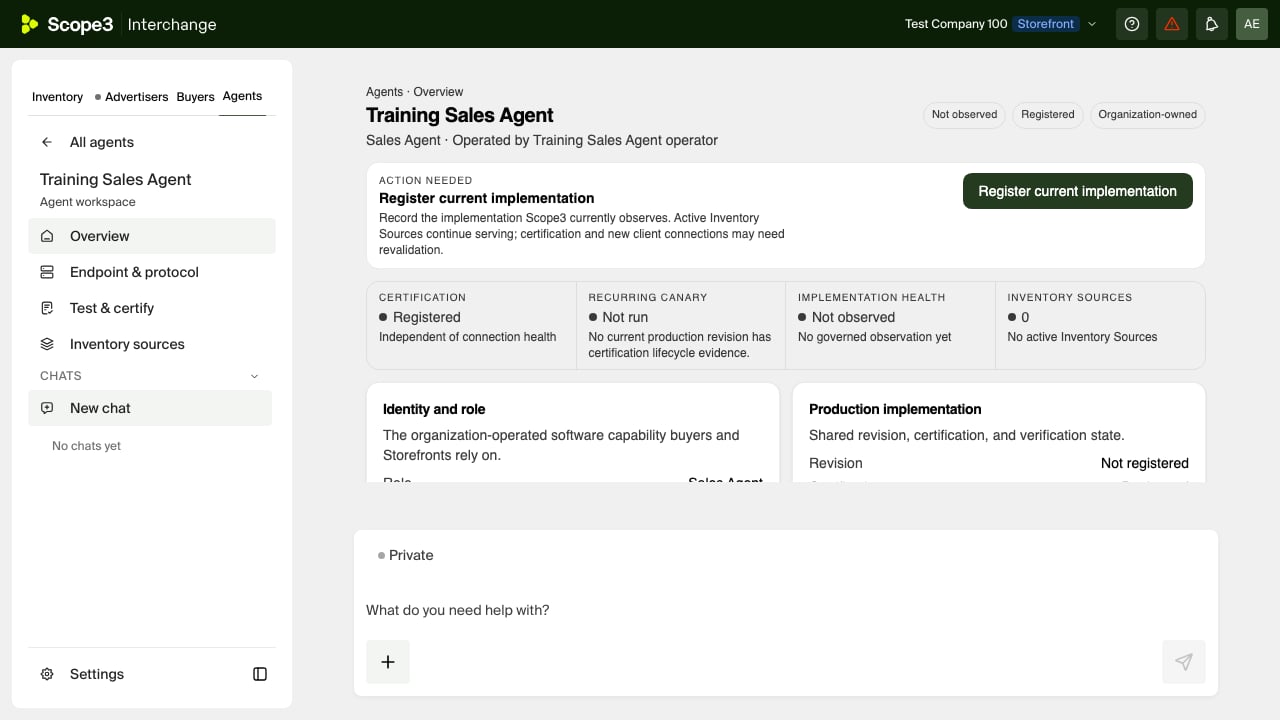
6. Create the Agent in Interchange
Open Agents, choose Create Agent, and enter:- the customer-facing Agent name;
- Sales Agent as the protocol role;
- Wholesale, Composing, or Both as the sales mode; and
- the existing claimed operator, or a new operator identity for the company that runs the Agent.
7. Connect and attach an Inventory Source
On the Agent page, open Inventory sources and choose Connect this Agent. Enter a Source name, the deployed Agent address, protocol, and authentication method in the secure Task. Credential values stay out of the conversation and model context. If the Agent supports both Storefront-built and Agent-supplied products, choose the product path for this Source. You can enable either path or both; the choice belongs to the Source and does not change the Agent’s declared capabilities.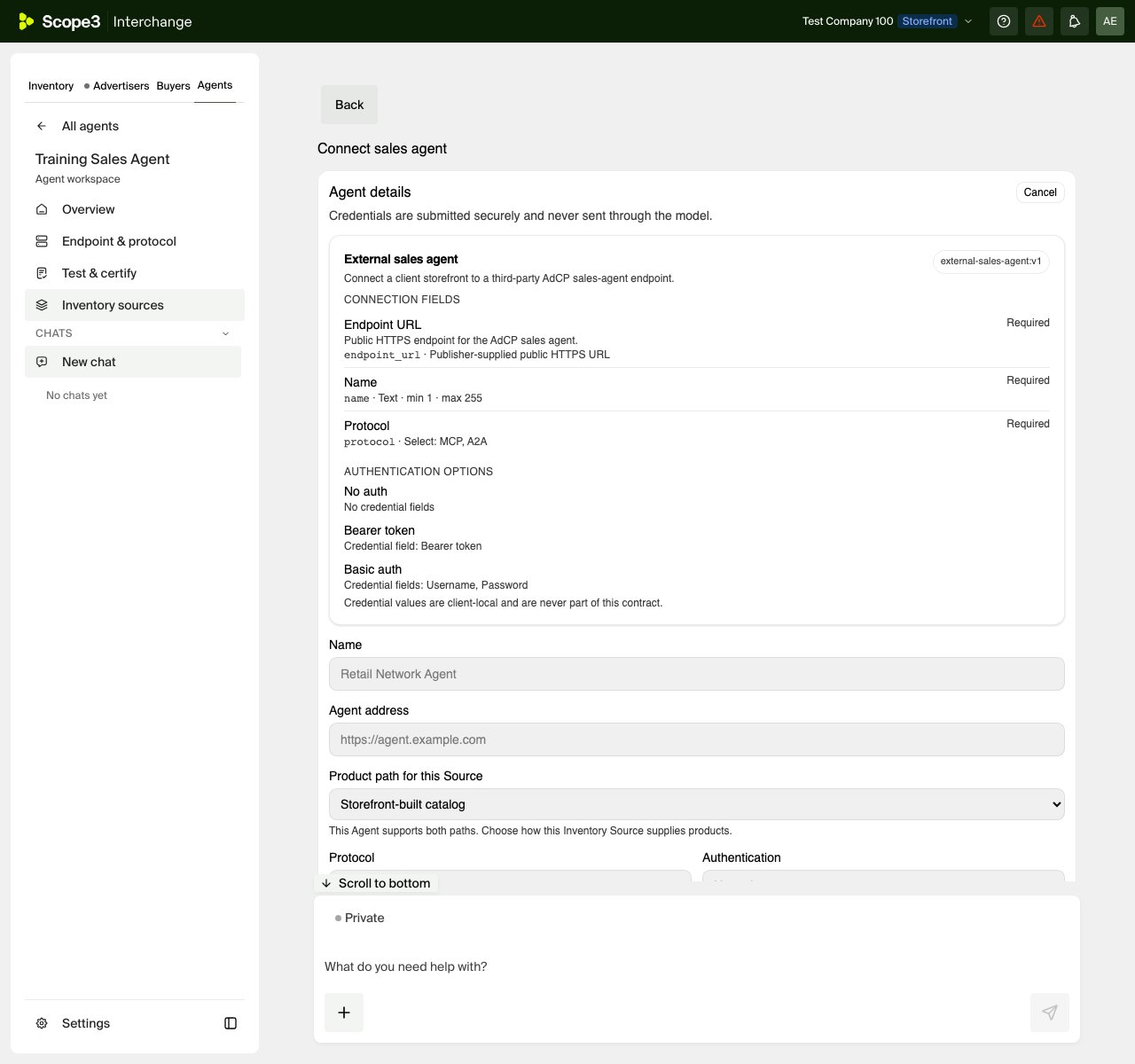
8. Run no-spend discovery while activation completes
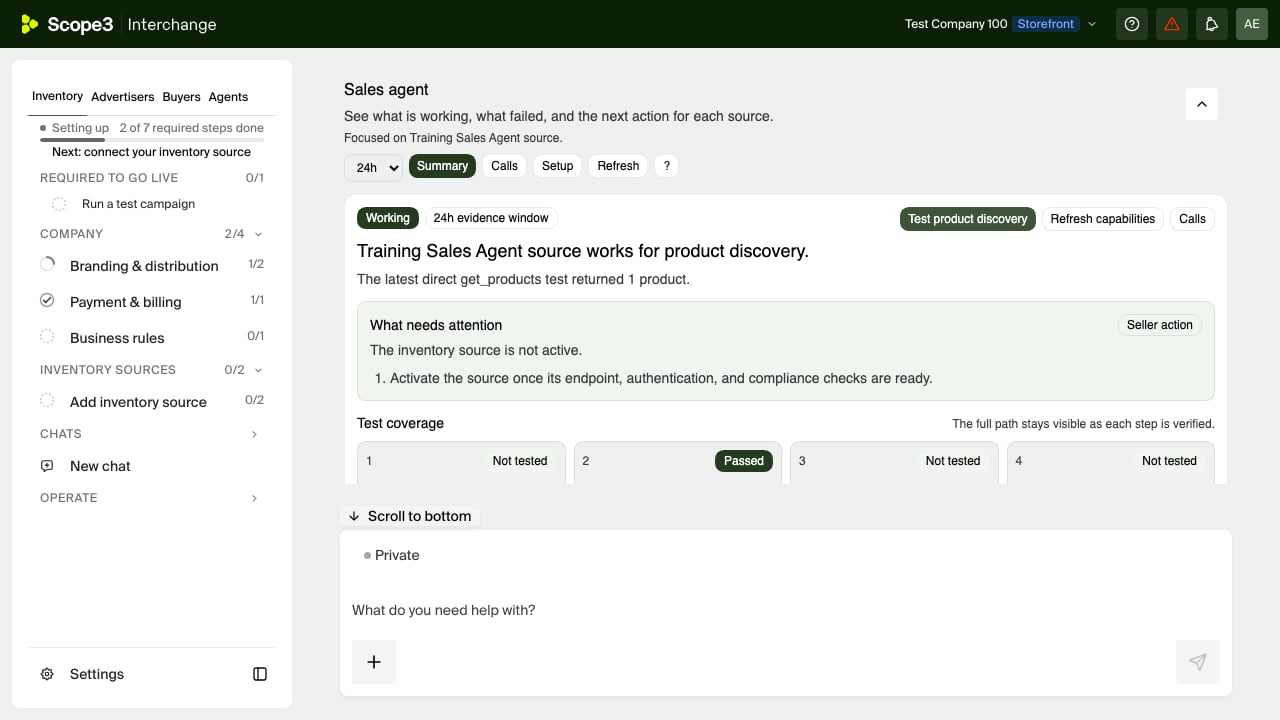
Source activation is governed separately and can remain Pending while certification or commercial gates are incomplete. You can still debug the connection: from Source diagnostics, choose Test product discovery to callget_products directly with a no-spend brief. This check does not create
a media buy and does not require the Storefront to be ready for transactions.
A passing result must name get_products; merely seeing a reachable endpoint
is not enough.
The Agent page’s Test & certify section can run the current public Sales
Agent validation skill in the organization’s isolated no-spend sandbox. Run
that complete workflow after the direct discovery check passes and the
Storefront readiness panel shows that its prerequisites are complete. The
validation skill proves the broader go-live path; the direct test is the first
debugging step for a newly connected endpoint. Use a transaction profile only
when you intend to exercise confirmed write paths.
9. Debug from durable evidence
Open the exact Source, then use Debug to inspect operation, outcome, latency, task status, and redacted request evidence. Correlate these identifiers across systems:- Source and Agent IDs identify the deployment and shared capability;
- activity and trace IDs identify the Interchange request;
- buyer and source task IDs identify async work on each side; and
debug_ididentifies the safe diagnostic record to share with support.
- no
get_adcp_capabilitiesreceipt: check DNS, TLS, endpoint, or credentials; - capabilities pass but no
get_productsreceipt: check the declared AdCP version and supported protocol; get_productsreturns an error: validate the Product schema and account resolution in your Agent;- Interchange shows a timeout but your Agent later succeeds: compare the observer budget before treating the Source as unreachable;
- storyboard passes but live traffic fails: inspect the upstream sandbox and OAuth receipt, not the fixture bridge.
10. Certify and distribute
Keep the Agent private while you stabilize its live Source. Register the exact production implementation revision, run the applicable validation profiles, and resolve every current certification requirement shown on the Agent page. When your organization wants to operate the Agent for other sellers, use the Agent page’s Who this Agent can serve card. Partner distribution is a separate commercial and authorization decision: each client seller must authorize its own Source, and the Agent’s certification and payment standing must remain current. See Partner sales-agent operations.Launch checklist
- The local storyboard passes with no schema failures.
- A live sandbox run reaches the real upstream platform.
- Authentication, tenant isolation, idempotency, and webhook retries pass.
- The production HTTPS endpoint returns capabilities and Products.
- The Agent exists once under the correct operator.
- The Source is attached to that exact Agent and becomes Active.
- No-spend
get_productspasses and appears in durable diagnostics. - The production revision and certification evidence are current.
- Partner distribution is enabled only for explicitly authorized sellers.