> ## Documentation Index
> Fetch the complete documentation index at: https://docs.interchange.io/llms.txt
> Use this file to discover all available pages before exploring further.
# Diagnose third-party sales agents
> Check whether an external AdCP inventory source is reachable, healthy, and responding to buyer requests
When your storefront uses a third-party AdCP-compatible sales agent as an
inventory source, Interchange can help you answer two different questions:
* **Is the source set up correctly?** Check source status, credentials,
advertised capabilities, and compliance.
* **What happened on recent buyer traffic?** Inspect recent AdCP calls,
responses, task statuses, and failures for that source.
Use both. A source can be configured correctly but still fail a specific buyer
request, and a failed buyer request can come from a valid business rejection
rather than a broken connection.
Diagnostics keep three evidence types separate:
* A **source test** is an explicit sandbox test against the selected source.
* A **source call** is an observed protocol exchange with the selected source,
such as `get_capabilities` or a passthrough `get_products` request.
* A **storefront buyer-path or composition run** describes work at the
storefront layer. It is not evidence that the selected source was called
unless a source exchange is attached to it.
This distinction matters for `no_ingredients`: a composition run can stop at
the storefront before it calls the external sales agent. That failure must not
be shown as a failed source call or source test. In ordinary passthrough mode,
the storefront sends the brief to the external agent's `get_products`; that
call uses the agent's finished products and does not require ingredients.
For external sales-agent sources, also separate **live source health** from
**component-cache health**. Live health answers whether passthrough discovery or
media-buy calls reached the source and completed. Component-cache health answers
whether Interchange can read the source's raw products/components for
merchandising without calling the source during buyer-request composition. Cache
complaints usually mean the source does not support a usable component response,
returned invalid/missing product metadata, has an errored or cold cache state, or
cannot refresh because of auth or reachability. Stale-but-usable cached rows are
not automatically a failure; they are valid composition inputs when the
storefront allows hard-stale OK cache reads. Soft-refresh age is handled
automatically by Interchange's stale-while-revalidate cache path; it does not
create a seller action item. A cache complaint does not by itself mean live
passthrough is down.
Interchange does not make wholesale product or signal catalog requests to every
external sales agent. For third-party sales-agent sources, those catalog requests
run only when product composition is on for the storefront and the source
reports AdCP 3.1+ support. If product composition is off, diagnostics treat the
source as pass-through and focus on live buyer-request activity instead of
component-cache readiness. When paid composition is enabled, only the source's
AdCP 3.1+ wholesale products are composition inputs; its ordinary finished
products are not reclassified as ingredients. Active managed ad-server sources
force composition because their raw inventory must be turned into products.
When a seller-operated source stays unhealthy long enough to trigger a proactive
Murph alert, the alert links directly to this diagnostics surface with the
affected source selected. Open that link first, then use the recent activity and
developer handoff sections for the partner-safe debug ID, task ID, operation ID,
and correlation headers behind the failing calls.
## Endpoint
`GET /api/v2/storefront/inventory-sources/{sourceId}/diagnostics`
Returns seller-facing diagnostics for one third-party sales-agent or modular
inventory source. The response combines the current source setup, recent AdCP
activity, test-run evidence, latency rollups, error rates, discovery
participation, demand impact, and developer handoff identifiers. New outbound
calls include a partner-safe `x-scope3-debug-id` that also appears in the
diagnostics handoff.
To run a direct source test, use the shared storefront operation
`run_inventory_source_discovery_test`, backed by:
`POST /api/v2/storefront/inventory-sources/{sourceId}/tests/discovery`
This source-scoped operation calls the selected external sales agent's
`get_products` with a read-only brief. It creates no media buy, spends nothing,
and does not test reporting or webhooks. Its outcome, product count, step, and
available debug identifiers are recorded as a durable source test run, so the
result remains available from `list_agent_test_runs` and in Source Diagnostics.
MCP hosts open the same Source Diagnostics app through the typed
`open_source_diagnostics` tool. The widget and its actions use shared MCP
contracts rather than sending a new chat message to Murph.
## Request
```bash curl theme={null}
curl "https://api.interchange.io/api/v2/storefront/inventory-sources/retail-adcp/diagnostics?windowHours=24" \
-H "Authorization: Bearer $SCOPE3_API_KEY"
```
```bash Run discovery test theme={null}
curl -X POST "https://api.interchange.io/api/v2/storefront/inventory-sources/retail-adcp/tests/discovery" \
-H "Authorization: Bearer $SCOPE3_API_KEY" \
-H "Content-Type: application/json" \
-d '{"brief":"Return representative products available to a US buyer."}'
```
## Parameters
| Field | Type | Required | Notes |
| ------------- | --------------- | -------- | ------------------------------------------------------------------------------------------------------------------------ |
| `sourceId` | string (path) | Yes | Storefront-scoped inventory source ID. |
| `windowHours` | integer (query) | No | Lookback window for activity and test-run rollups. Defaults to the service window, minimum `1`, maximum `720` (30 days). |
## Response
```json theme={null}
{
"source": {
"id": "42",
"sourceId": "retail-adcp",
"name": "Retail AdCP Agent",
"executionType": "AGENT",
"status": "ACTIVE",
"agentId": "agent_retail",
"endpointUrl": "https://sales-agent.example.com/mcp",
"protocol": "MCP",
"auth": {
"type": "bearer",
"required": true,
"configured": true
},
"capabilities": {
"tools": ["get_products", "create_media_buy"],
"products": "supported",
"createMediaBuy": "supported",
"updateMediaBuy": "unknown",
"signals": "unsupported"
},
"health": {
"status": "healthy",
"lastError": null,
"lastErrorCode": null,
"lastErrorAt": null,
"lastSuccessAt": "2026-06-18T12:45:00Z",
"lastCheckedAt": "2026-06-18T12:50:00Z"
}
},
"window": {
"hours": 24,
"startedAt": "2026-06-17T13:00:00Z",
"endedAt": "2026-06-18T13:00:00Z",
"sampledActivityCount": 37,
"activityTruncated": false,
"sampledTestRunCount": 4
},
"performance": {
"requestCount": 18,
"responseCount": 18,
"exchangeCount": 18,
"completedCount": 15,
"failedCount": 1,
"inputRequiredCount": 1,
"pendingCount": 1,
"rejectedCount": 0,
"timeoutCount": 0,
"timeoutRate": 0,
"errorRate": 0.06,
"inputRequiredRate": 0.06,
"completedRate": 0.83,
"latencyStatus": "within_threshold",
"latencyThresholdMs": 30000,
"overThresholdCount": 0,
"staleAsyncResponseCount": 0,
"p50LatencyMs": 1200,
"p95LatencyMs": 4200,
"p99LatencyMs": 4200,
"unknownLatencyCount": 0
},
"comparison": {
"previousWindow": {
"startedAt": "2026-06-16T13:00:00Z",
"endedAt": "2026-06-17T13:00:00Z",
"exchangeCount": 14,
"issueCount": 0,
"timeoutCount": 0,
"errorRate": 0,
"p95LatencyMs": 3100,
"sampledActivityCount": 28,
"activityTruncated": false
},
"issueDelta": 2,
"timeoutDelta": 0,
"errorRateDelta": 0.06,
"p95LatencyDeltaMs": 1100,
"trend": "new_issue",
"summary": "New issue pattern in this window: 2 more affected requests."
},
"toolBreakdown": [
{
"tool": "get_products",
"exchangeCount": 12,
"completedCount": 11,
"failedCount": 1,
"inputRequiredCount": 0,
"rejectedCount": 0,
"timeoutCount": 0,
"p95LatencyMs": 3600
}
],
"discoveryParticipation": {
"calledCount": 12,
"skippedCount": 0,
"excludedCount": 0,
"timedOutCount": 0,
"skipReasons": []
},
"outcomeMix": {
"returnedProductsCount": 10,
"returnedNoProductsCount": 1,
"failedCount": 1,
"businessRejectedCount": 0,
"pendingCount": 1,
"inputRequiredCount": 1,
"timedOutCount": 0,
"skippedCount": 0
},
"demandImpact": {
"buyerRequestsAffected": 2,
"missedProductOpportunityCount": null,
"notes": [
"Affected request count includes failed, timed-out, rejected, input-required, and skipped diagnostic attempts in this window.",
"Missed product opportunity count is not estimated until buyer-side debug demand captures expected product counts."
]
},
"recentActivity": [
{
"id": 98765,
"timestamp": "2026-06-18T12:45:00Z",
"tool": "get_products",
"taskStatus": "COMPLETED",
"activityType": "response",
"taskId": "task_123",
"operationId": "op_456",
"contextId": "ctx_789",
"idempotencyKey": "idem_abc",
"correlationId": "trace_def",
"initiatorEmail": "s***@example.com",
"origin": {
"kind": "live_demand",
"testRunUid": null,
"testRunStatus": null,
"testRunToolName": null,
"testRunCreatedAt": null
},
"isIssue": false,
"summary": "Returned 5 products."
}
],
"diagnosis": {
"severity": "ok",
"owner": "seller",
"topCause": "Source is responding within threshold.",
"issues": [],
"nextSteps": ["Continue monitoring failed calls and webhook completion."],
"developerHandoff": {
"sourceId": "retail-adcp",
"sourceName": "Retail AdCP Agent",
"agentId": "agent_retail",
"endpointUrl": "https://sales-agent.example.com/mcp",
"latestTaskId": "task_123",
"latestOperationId": "op_456",
"latestContextId": "ctx_789",
"latestIdempotencyKey": "idem_abc",
"latestCorrelationId": "trace_def",
"correlationHeaders": {
"x-scope3-trace-id": "trace_def"
},
"latestError": null
}
},
"docs": [
{
"label": "Inventory sources",
"url": "https://docs.interchange.io/v2/storefront/inventory-sources/overview"
}
]
}
```
The most important response blocks are:
| Field | What it tells you |
| ------------------------ | ---------------------------------------------------------------------------------------------------------------------------------------------------------------------------------------------------------------------------------------------------------------------------------------------------------------------------------------------------- |
| `source` | Current setup state: source identity, status, endpoint, auth, advertised capabilities, and latest health. |
| `window` | The lookback period and how much activity/test-run evidence was sampled. `activityTruncated: true` means the 200-row sample cap was reached; `recentActivity[]` shows only the most recent 200 rows, so counts and rates reflect the sample rather than the full window. |
| `performance` | Request/response counts, completion/failure/input-required rates, timeout rate, latency percentiles, and whether latency exceeded the configured threshold. |
| `comparison` | Current lookback window compared with the immediately preceding equal-length window. Trends are `new_issue`, `worse`, `improved`, `recovered`, `unchanged`, or `not_enough_data`; they describe observed source activity only. Previous-window `sampledActivityCount` and `activityTruncated` use the same 200-row sample cap as the current window. |
| `toolBreakdown[]` | Per-tool outcomes across all sampled calls, including `get_products`, `create_media_buy`, updates, and other AdCP tools. |
| `discoveryParticipation` | Whether buyer discovery called, skipped, excluded, or timed out this source. |
| `outcomeMix` | Whether calls returned products, returned no products, failed, timed out, waited for input, or were business-rejected. |
| `demandImpact` | Affected request count plus notes. Missed product opportunity count is currently `null` until buyer-side debug demand captures expected product counts. |
| `recentActivity[]` | Most recent calls, responses, task statuses, errors, trace/correlation identifiers, initiator email, sandbox-test/live-demand origin, and summaries. |
| `diagnosis` | Severity, **owner**, top cause, structured `issues[]` breakdown, next steps, and developer handoff details to share with the source operator. |
`diagnosis.owner` tells you who must act:
* `seller` — a generic external sales agent you operate, or an adapter whose
credentials need re-authorizing. The `topCause` and `nextSteps` are addressed
to you.
* `scope3` — an official Scope3-hosted adapter (Pinterest, Reddit, Snap, …)
whose runtime is failing. Scope3 operates that runtime; the failure is ours to
fix and recovers automatically, so there is nothing for you to do. `nextSteps`
will say so rather than asking you to debug our infrastructure.
`diagnosis.topCause` is the primary explanation to show first. Use
`diagnosis.issues[]` when more than one signal is present in the same window:
for example stale async callbacks, caller-deadline timeouts, slow responses,
non-timeout failures, input-required responses, business rejections, skipped
diagnostic attempts, missing auth, or inactive sources. Each issue includes a
stable `mode`, `severity`, affected `count`, and human-readable `summary`.
Issue `mode` values use the same source failure vocabulary as the diagnosis
model, such as `stale_async`, `timeout_degraded`, `auth_missing`,
`source_runtime_error`, `business_rejected`, and `input_required`.
`comparison.trend` is a quick movement signal, not an uptime or SLA claim. It
compares sampled source activity in the requested window with the immediately
previous window of the same length. `not_enough_data` means neither window has
enough source activity to compare; latency remains unknown when request and
response rows cannot be paired.
The latest source-health check can be older than the selected activity window.
When an older failed check has no newer traffic to confirm or clear it, the
overview labels it as stale evidence and asks for current verification. It does
not claim the source is currently down, and it does not say that no action is
needed. When the selected window has newer protocol exchanges and no observed
failures, that activity supersedes an older failed health record in the current
diagnosis.
## Errors
* `400 BAD_REQUEST` — `windowHours` is not a positive integer or is greater than `720`.
* `401 UNAUTHORIZED` — missing or invalid API key.
* `404 NOT_FOUND` — no inventory source with this `sourceId` exists for the storefront.
See [Errors](/v2/reference/errors) for the full error contract.
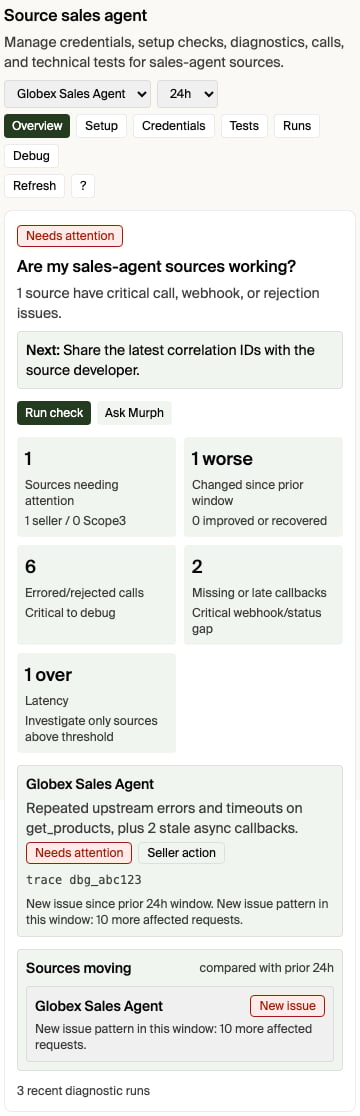
## Open the diagnostics surface
Diagnostics open from the source you are looking at, scoped to that source:
* **From the source itself.** In the ad-server or sales-agent source app in
chat, use **Open full diagnostics**. It opens the Source Diagnostics app
already focused on the connection you had selected. (The in-app **View
details** / **View diagnostics** buttons are different — they switch to the
advanced tab inside the same source app.)
* **From Pending operations.** When a source you operate degrades, it appears
in the **Sources degraded** group of the Pending operations view with its
severity and a one-line summary. Each row's **Open full diagnostics** opens
the Source Diagnostics app scoped to that source.
* **By asking Murph.** Ask "why is `` failing?" or "show me diagnostics
for ``" — Murph opens the Source Diagnostics app scoped to that
source. Naming the source focuses the app on it; otherwise it opens on the
source you last had selected.
* **From the Help menu.** Open **Ask Murph**, choose **Help**, then choose
**Diagnostics** for the storefront-wide diagnostics view (change history,
debug calls, source tools, test runs).
Choose **Show me** from a Source Diagnostics announcement, or choose **?** in
the diagnostics surface, to start the two-minute quick tour. The tour teaches
the same operating sequence in every supported chat host:
1. Start with the question: is this source healthy, what changed, and who acts?
2. Choose the evidence window. Start with 24 hours, narrow for an active
incident, or widen it to confirm a pattern.
3. Read the overview verdict before inspecting individual calls.
4. Use **Evidence** for recent calls and partner-safe handoff identifiers.
5. Take the smallest diagnosed next action, then refresh or run a focused test.
The surface has three primary views: **Summary**, **Evidence**, and **Setup**.
**Run discovery test** calls the selected external source's `get_products`
directly with a read-only, no-spend brief and records the result as a durable
source test run. It does not create a media buy. **Refresh capabilities** is the
secondary setup check: it calls the source capability endpoint directly and
shows the result in the app; it does not send a synthetic question to Murph.
Capability refresh verifies endpoint reachability, credentials, and declared
tools only—it does not prove discovery.
A buyer-path result appears under the selected source only when diagnostics have
an observed source exchange to attribute to it. A storefront intelligence run
that stopped before source dispatch remains storefront evidence, not a failed
call against the external agent.
In **Setup**, a complete third-party sales agent is shown as pass-through by
default. If composition is locked on, the storefront still has an active
managed ad-server source; that source is named in the app because it—not the
selected third-party agent—is what requires composition. Deactivate the managed
source before switching to pass-through. Product composition for a third-party
agent is an optional paid add-on.
For a pass-through source, **Connected** means its source connection and required
credentials are ready. Setup does not wait for an Interchange wholesale catalog,
and an unobserved reporting status does not become setup work. A subsequently
observed degraded or unhealthy source is shown as **Needs attention** instead.
The tour changes tabs and highlights controls, but it does not change source
configuration. Any product action keeps its normal safeguards.
You can also open Source Diagnostics directly by replacing `` with
your account id:
```text theme={null}
https://interchange.io//murph?view=chat&askMurph=open_feature&feature=source-health
```
To focus the app on one inventory source, include `diagnosticsSourceId`:
```text theme={null}
https://interchange.io//murph?view=chat&askMurph=open_feature&feature=source-health&diagnosticsSourceId=
```
Task-level filtering is available inside the app's recent-call search after it
loads; there is not currently a task-id deep link.
Slack cannot render the MCP app inline. When Murph diagnoses a sales-agent
source from Slack, it provides this same account- and source-scoped link as a
**Open sales-agent diagnostics** button. Open it, choose **Run discovery test**,
then reply **done** in the Slack thread. Murph looks up the recorded source test
and interprets it; you do not need to copy the result between apps.
## Start with the inventory source
Open the storefront inventory source in the app, or call
[Get storefront readiness](/v2/storefront/tasks/get-readiness). The
`sourceDiagnostics[]` entry for each source gives the current operating picture:
| Field | What it tells you |
| ---------------- | --------------------------------------------------------------------------------------------------------------------------------------------------------------------------------------------------------------------------------------------------------------------------------------------------------------------------------------------------------------------------------------- |
| `sourceStatus` | Whether the source is active, pending, or disabled. |
| `auth` | Whether the source requires credentials and whether they are configured. |
| `capabilities` | Whether the source advertises support for product discovery, media-buy creation, updates, signals, and wholesale products. |
| `productBuilder` | Whether the source is classified for `composition`, `passthrough`, or `unknown`; use `wholesaleProductCount`, `signalCount`, `catalogCacheCold`, and `declaredUnsupportedIngredients` to interpret component-cache readiness. For third-party sales-agent sources, component-cache readiness is evaluated only when product composition is on and the source reports AdCP 3.1+ support. |
| `compliance` | Latest AAO / AdCP compliance result for the source. |
| `debug` | Sanitized advertised tools, channels, publisher domains, protocol version, billing support, and related capability metadata. |
| `health` | Current source health, including latest error, latest success, and latest check timestamps when available. |
If the source is not active, credentials are missing, or the source does not
advertise the tool you need, fix that before debugging individual buyer
requests.
## Inspect recent AdCP activity
For source-specific traffic, use **Ask Murph > Help > Diagnostics > Debug
calls** and ask about the inventory source by name. Murph can inspect recent
third-party sales-agent activity for the caller's storefront: requests,
responses, webhook/status changes, task IDs, task statuses, and sanitized
payloads. You can ask for a specific time range ("last 2 hours" or an ISO
start/end window) or provide a debug/correlation ID from `x-scope3-debug-id`,
`traceparent`, `x-request-id`, operation ID, task ID, context ID, or idempotency
key.
The diagnostics surface also exposes a bounded, redacted details panel for
recent calls. Use it when a sales-agent developer needs the technical handoff:
the observed time, operation/task identifiers, outbound request endpoint,
partner-safe headers, and request body when those were captured, plus the
response or error payload. The displayed headers are limited to debugging and
correlation values such as `x-scope3-debug-id`, `traceparent`, and
`x-request-id`; authorization headers, cookies, credentials, tokens, signed URL
parameters, and email addresses are redacted before display or copy.
This is the right path for questions like:
* "Why did this source fail `get_products`?"
* "What did Interchange send to my sales agent?"
* "What did my sales agent return?"
* "Which recent calls are failed or waiting for input?"
* "Is this a protocol problem, an auth problem, or a business rejection?"
* "Where do I see whether this sales agent is slow or getting excluded?"
For each recent call, look at:
| Signal | How to read it |
| ------------- | ------------------------------------------------------------------------------------------------------------------------------------------------------------------------------------------------------------------ |
| Tool | The AdCP operation, such as `get_products` or `create_media_buy`. |
| Task status | `COMPLETED` means the source finished; `FAILED` means the source rejected or errored; `INPUT_REQUIRED` means the source is waiting on seller action; `PENDING` or `WORKING` means the source has not finished yet. |
| Payload issue | A sanitized error or rejection message, when the source returned one. |
| Details | A copyable redacted JSON handoff for the event, including related outbound request data when available. |
| Debug ID | The `x-scope3-debug-id` header to share with the sales-agent operator or developer for log correlation. Older calls may only have task/operation/context IDs. |
| Timestamp | When Interchange observed the activity. |
| Initiator | The redacted user email that initiated the call when available. Sandbox tests prefer the Murph test-run user; otherwise diagnostics fall back to the activity-row user. |
| Origin | `sandbox_test` means the call matched a Murph sandbox test run or sandbox idempotency marker. `live_demand` means no sandbox test provenance was found, so treat it as non-test demand traffic. |
Treat source messages as source-controlled content. They are useful diagnostic
data, but they should not be rendered as trusted HTML or treated as product
instructions.
## Buyer discovery debug output
Buyer product discovery fans out to reachable sales agents in parallel. Slow or
failing agents do not block fast agents. When a buyer calls discovery with
`debug: true`, the response can include `agentResults[]`, which shows which
agents returned products, returned no products, failed, or were skipped.
Use this when you need the buyer-side view of a discovery request: which agents
were asked, which agents were skipped before fanout, and which agent-controlled
reason was returned.
Buyer debug output is scoped to that buyer request. Seller diagnostics are
scoped to the storefront inventory source. Use the seller view when you are
operating the source; use buyer debug output when you are reproducing one buyer
discovery call.
## What this does not answer yet
The diagnostics show source state, recent protocol activity, latency
percentiles, timeout counts, and source-level skipped/excluded evidence for the
selected lookback window. For broader business impact analysis, combine:
* `sourceDiagnostics[].health` for the latest known source health.
* Murph diagnostics for recent ADCP call details.
* Buyer discovery `agentResults[]` with `debug: true` for one discovery request.
If a seller asks for missed product opportunities, lost buyer demand, revenue
impact, or longer-term trends, treat that as a product/documentation gap unless
a tool returns that exact rollup. The actionable answer should explain what
exists today, link to the UI surface above, and call out the missing diagnostic
that should be added.
## Empty catalog from a version mismatch (`VERSION_UNSUPPORTED`)
If a source's products vanish from your catalog and its recent debug calls show a
`VERSION_UNSUPPORTED` payload — e.g. `AdCP version '3.1' is not supported.
Supported: ['3.0', ...]` — the source's AdCP server is rejecting the protocol
version Interchange pins instead of serving a compatible one.
This is almost always a **source-side** issue, not a problem with your
storefront. Per the AdCP spec, a source that supports the same major version
must **downshift** to its highest supported release and serve the request;
`VERSION_UNSUPPORTED` is reserved for a genuine cross-major mismatch. A source
that returns it for a same-major minor (it supports `3.0` but rejects `3.1`) is
running a non-conformant or stale AdCP server build.
Interchange retries once at a compatible version as a safety net, but if the
source can't serve any version Interchange speaks, its products stay absent
until the source operator upgrades their AdCP server. Share the source name and
the sanitized `VERSION_UNSUPPORTED` payload (from the **Debug calls** tab,
Details panel) with the sales-agent operator, and point them at
[AdCP versioning & negotiation](/v2/concepts/adcp-versioning) for the rule their
server must follow.
## Practical checklist
When a source is not showing up or a buyer request did not return products:
1. Confirm the inventory source is active.
2. Confirm credentials are configured if the source requires auth.
3. Confirm the source advertises the needed capability, especially
`get_products` for product discovery.
4. Check source health for the latest error, success, and check timestamps.
5. Ask Murph to inspect recent debug calls for that source.
6. If reproducing a buyer discovery request, run discovery with `debug: true`
and inspect `agentResults[]`.
7. If the failure is still unclear, share the source name, task ID, timestamp,
and sanitized error with your sales-agent operator or Scope3 support.
## Related
Register and manage the sources behind your storefront
Inspect readiness and per-source diagnostics
Understand buyer discovery and `agentResults`
Shared Interchange error contract
Why a version mismatch empties a catalog, and the downshift rule
 Diagnostics open from the source you are looking at, scoped to that source:
* **From the source itself.** In the ad-server or sales-agent source app in
chat, use **Open full diagnostics**. It opens the Source Diagnostics app
already focused on the connection you had selected. (The in-app **View
details** / **View diagnostics** buttons are different — they switch to the
advanced tab inside the same source app.)
* **From Pending operations.** When a source you operate degrades, it appears
in the **Sources degraded** group of the Pending operations view with its
severity and a one-line summary. Each row's **Open full diagnostics** opens
the Source Diagnostics app scoped to that source.
* **By asking Murph.** Ask "why is `
Diagnostics open from the source you are looking at, scoped to that source:
* **From the source itself.** In the ad-server or sales-agent source app in
chat, use **Open full diagnostics**. It opens the Source Diagnostics app
already focused on the connection you had selected. (The in-app **View
details** / **View diagnostics** buttons are different — they switch to the
advanced tab inside the same source app.)
* **From Pending operations.** When a source you operate degrades, it appears
in the **Sources degraded** group of the Pending operations view with its
severity and a one-line summary. Each row's **Open full diagnostics** opens
the Source Diagnostics app scoped to that source.
* **By asking Murph.** Ask "why is `